Hands Full, Door Open
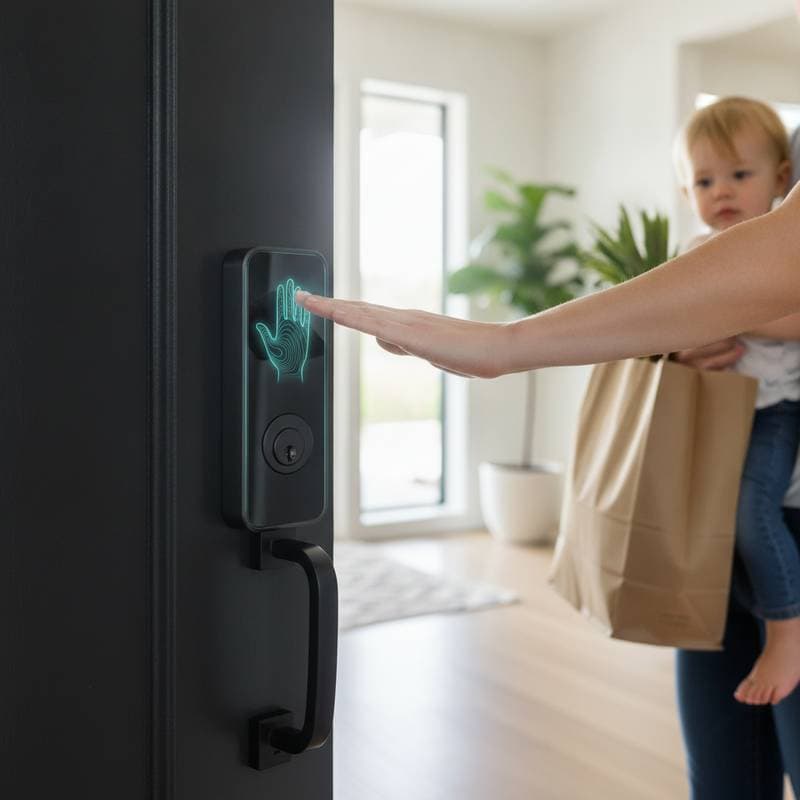
Picture this: both arms loaded with groceries, rain soaking your coat, and no free finger to fish for keys or tap a scanner. A palm recognition smart lock lets you pause in front of the door while a contactless sensor reads the shape and surface patterns of your hand. The latch releases, and the hallway lights up before you set anything down.
This technology is gaining attention as an alternative to fingerprints, keypads, phone apps, and traditional keys. Fingerprint readers often fail when hands are wet, dusty, gloved, or poorly positioned. Palm recognition provides another route into your home. The appeal lies in hands-free entry that feels quick, hygienic, and futuristic without requiring a complete smart home overhaul.
Why Palm Recognition Matters for Smart Locks
Fingerprint locks depend on detailed ridge patterns from a fingertip. Palm recognition can use a larger area, combining palm lines, shape, depth, vein patterns, or other visual characteristics. The exact method depends on the manufacturer, and product descriptions can use the term loosely. You should read the technical specifications before buying.
A good palm recognition lock creates a biometric template during setup. The lock then compares a new scan with that stored template. Some systems process data locally inside the lock, while others rely on a connected hub or cloud service. Local processing usually offers stronger privacy and continued operation when your internet connection fails.
Contactless entry also reduces the need to touch a public surface. That can appeal to families, rental property owners, and anyone who dislikes pressing a fingerprint sensor with dirty hands. It is not just about convenience. It is about creating an entry routine that fits real household habits.
How to Choose the Right Lock
Confirm the Recognition Method
Look for clear language describing how the palm is detected. A sensor that merely identifies a hand shape is not the same as a biometric system that verifies an authorized user. Ask these questions:
- Does the lock recognize an individual palm or only detect movement?
- Does it use visible light, infrared sensing, depth sensing, or palm veins?
- Is biometric data stored locally?
- Can you delete users without resetting the entire lock?
- Does the system keep working if the WiFi network goes offline?
A lesser known industry detail is that palm recognition performance often depends on the distance between your hand and the sensor. A lock may work best when your palm is presented inside a narrow zone, even if marketing images suggest a wider range. Positioning guidance matters more than a dramatic product photo.
Check Door Compatibility
Most replacement smart locks fit a standard deadbolt, but not every door is suitable. Measure the backset, check the thickness, and inspect the clearance around the interior thumb turn. A multipoint door, narrow stile door, rim lock, or unusual mortise setup may require an adapter or professional installation.
You also need to consider the exterior environment. A sensor mounted on an exposed porch faces sunlight, rain, dust, and temperature changes. Look for an outdoor rating, sealed electronics, and a physical key override. If the scanner fails, you should still have a dependable way to enter.
Compare Connectivity and Ecosystems
A lock may connect through Bluetooth, WiFi, Thread, or a hub. Bluetooth can conserve battery power, while WiFi supports remote access without an additional bridge. Thread can provide efficient communication in a compatible smart home network, though you may need a controller that supports the standard.
Matter support can improve compatibility across platforms such as Apple Home, Google Home, and Amazon Alexa. Still, Matter does not guarantee that every biometric feature will work in every app. A platform may support locking status and remote commands while leaving palm enrollment inside the manufacturer application.
Three Product Paths to Consider
Product availability and prices change, so treat these figures as practical shopping references rather than fixed quotes.
- Budget option: Lockly Flex Touch, about $150. This fingerprint focused model is not a palm recognition lock, but it provides a useful lower cost biometric comparison. Choose it if your main goal is keyless entry and you are comfortable using a fingertip.
- Mid range option: Philips DDL709-FVP, about $300. Availability depends on the region, but this type of smart lock demonstrates the premium keypad, camera, and biometric features found in newer access products. Confirm local support and door compatibility before ordering.
- Premium option: Lockly Vision Elite, about $500. It combines advanced access features, video monitoring, and multiple unlocking methods. Its value is strongest when you want one exterior device to manage entry and security rather than adding separate hardware.
Dedicated palm recognition locks remain less common than fingerprint models, so verify that the product truly supports palm biometrics. Some newer systems use a palm or hand gesture as a contactless trigger, then confirm identity through a phone, code, or separate credential. That can still be useful, but it is not the same as fully biometric palm entry.
Privacy, Security, and Household Access
Biometric credentials cannot be changed like a password. If a database leaks, you cannot replace your palm pattern. Select products that encrypt stored templates, process scans locally, and offer a clear deletion process. Avoid placing a sensor where visitors can easily photograph or study your entry routine.
Create individual profiles rather than sharing one administrator account. Give children, cleaners, dog walkers, and guests temporary codes when possible. Review access logs regularly, and remove old permissions after a tenant, contractor, or house sitter no longer needs access.
Use the lock as one layer of protection. A strong door, quality strike plate, long structural screws, good exterior lighting, and a working alarm still matter. Smart features cannot compensate for a loose frame or a weak deadbolt installation.
Installation, Costs, and Reliability
A basic replacement may take less than an hour if your existing deadbolt is correctly aligned. Realistically, allow more time for calibration, app setup, user enrollment, and testing. Professional installation often costs about $100 to $250, with higher prices for unusual doors or electrical work.
Do not drill, alter a fire rated door, or modify a multipoint locking system without checking local requirements and manufacturer instructions. A locksmith can confirm whether the lock preserves emergency egress and physical security. If the device requires hardwired power, consult a qualified electrician rather than extending household wiring yourself.
Battery life depends on scan frequency, network activity, weather, and motor resistance. Replace batteries when the app warns you, not after the motor begins to sound strained. An insider tip is to test the lock with the door open during setup.
Making Contactless Entry Work for You
Start by deciding what you want to improve. If wet hands and shared touch surfaces are your main complaints, palm recognition may suit your routine. If family members need dependable access during outages, prioritize a physical keyway, keypad, and strong battery warning system.
Whether you are dreaming of a completely keyless home or simply want easier access after shopping, compare the entire ownership experience, not only the scanner. Transform your entryway into a calm, predictable arrival point with layered credentials and sensible security habits.
If the choices feel overwhelming, a vetted installer can check your door, explain upgrade paths, and prevent expensive fitment mistakes.