Budget Smart Home Gadgets Under $25 Worth Buying Now
A smarter home does not have to start with a costly hub, a new thermostat, or a full set of connected appliances. A few inexpensive devices can automate everyday tasks, improve lighting, and make routines easier to manage. The best starter gadgets under $25 solve one clear problem and work with the equipment you already own.
Prices change between stores and sales, so check the current listing before you buy. Also confirm that a product works with your phone and voice assistant, if you use one. With those basics in mind, these affordable smart home devices offer useful upgrades without stretching a household budget.
Smart Plugs for Everyday Automation
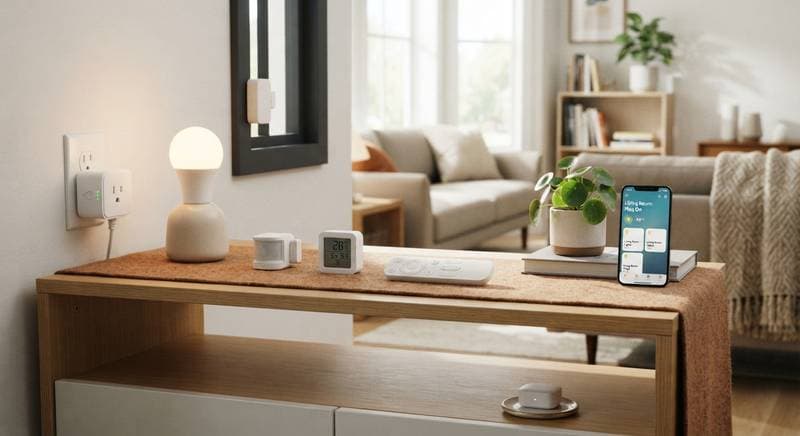
A smart plug turns a regular lamp or small appliance into a connected device. Plug it into a wall outlet, add it to the maker's app, then set schedules or control it from your phone. Many single plugs from brands such as TP-Link Tapo and Kasa often sell for less than $25.
The practical benefit is simple. A lamp can turn on before you enter a room, or a fan can switch off automatically when you leave. You can also group compatible plugs so several lights respond to one voice command. For renters, a plug offers a low-commitment way to try home automation without changing wiring.
Check the maximum supported load before connecting anything. Smart plugs are usually intended for lamps and modest household devices, not high-draw heaters or major appliances. Look for energy monitoring if you want to see how much electricity a connected device uses. That feature can help identify waste, though savings depend on your habits and the appliance.
Motion Sensors for Hands-Free Lighting
A small motion sensor can trigger a connected light or smart plug when someone walks by. It is handy in a hallway, pantry, or laundry area, where reaching for a switch may be inconvenient. Entry-level sensors from brands such as Aqara may fall near the budget range, though some require a compatible hub.
Before buying, check whether the sensor connects directly to your home network or needs a bridge. A hub adds cost, so a low device price may not reflect the full setup. Some smart bulbs and ecosystems also offer motion sensing through cameras or built-in presence features, which can be an alternative.
Set the sensor to activate lights only when the room is dark, if that option is available. This keeps a bright kitchen from lighting up every time someone passes during the day. A short shutoff delay can also reduce wasted power while still giving you enough time to move through the space.
Smart Bulbs for Flexible Atmosphere
A color smart bulb can shift from bright white for chores to softer tones for winding down. Many individual bulbs from brands such as WiZ and TP-Link Tapo are commonly available under $25, making them an easy entry point for connected lighting. Some models connect directly to Wi-Fi, while others use a separate hub.
Start with the room where lighting changes would make the biggest difference. A bedside lamp, desk light, or living room corner is often more useful than replacing every bulb at once. App controls can set brightness, color, and schedules, while voice assistants let you make quick adjustments without finding your phone.
Pay attention to the bulb's size, base, and brightness before ordering. Smart bulbs need to remain switched on at the wall to receive commands, so they may not suit a fixture controlled by a frequently used physical switch. If other household members prefer the switch, consider a smart plug or a smart switch instead.
Contact Sensors for Doors and Cabinets
A contact sensor detects when a door or window opens. A basic model can send an alert to your phone, while a compatible system can also trigger a light or sound an alarm. Budget-friendly options from brands such as Govee and Aqara may fit under $25, depending on the model and whether a hub is needed.
These sensors can be useful on a side door, medicine cabinet, or storage area. A notification when a door opens can offer peace of mind, especially when you are away. For a child's room or a cabinet with supplies you want to keep track of, the alert can also provide a helpful reminder.
Treat a low-cost contact sensor as an awareness tool, not a replacement for a proper security system. Check battery requirements, notification settings, and how the device behaves if the internet connection drops. For windows and exterior doors, keep using sound locks and other basic security measures.
Temperature Sensors for Better Room Comfort
A stand-alone temperature sensor can help reveal why one room feels warmer or cooler than the rest of the home. Some affordable models report temperature and humidity in an app, and selected products can trigger compatible fans or other devices through automations. Verify those automation options before purchasing.
Place the sensor away from direct sunlight, heating vents, and exterior walls for a more representative reading. It can be useful in a nursery, home office, or upstairs bedroom where conditions often differ from the main living area. The data may help you adjust a fan, close blinds, or change a thermostat schedule.
A sensor alone does not control heating or cooling. It offers information, and the ability to automate depends on the other devices in your setup. That distinction matters when comparing inexpensive gadgets. A clear reading can still be valuable, but it will not replace a compatible thermostat or climate control system.
Smart Remote Controls for Older Devices
An infrared smart remote can connect older equipment, such as a television or air conditioner, to an app. Some compact models from brands such as BroadLink are often priced below $25. They send commands much like a traditional remote, then let you create scenes or schedules through a compatible app.
This can reduce the number of remotes on a coffee table and make simple routines easier. A bedtime scene, for instance, could switch off a compatible television and adjust other connected devices. Check that the remote supports the specific equipment you own, since not every model handles every command or device type.
Infrared remotes usually need a clear path to the equipment. They may not work through a cabinet door or around a corner. If your television or appliance already connects to a smart assistant, its built-in controls may be more reliable than adding another device.
USB Sensors and Simple Leak Alerts
A basic water leak sensor can warn you when moisture reaches the floor near a sink, washing machine, or water heater. Some affordable models cost less than $25, while connected versions may require a hub or companion app. Read the product details carefully, since a local alarm and a phone notification are different features.
A leak alert is most useful when placed where a small drip could go unnoticed. Under a kitchen sink or behind a washing machine are practical starting points. Test the alarm after installation and check its battery periodically. A sensor cannot stop a leak, but an early warning can help you respond before water spreads.
Build a Starter Setup That Fits Your Home
A low-cost gadget is a good buy when it solves a real annoyance and fits your existing setup. Before ordering, check these basics.
- Compatibility: Confirm support for your phone, voice assistant, and other connected devices.
- Connection needs: Find out whether the product requires a hub, bridge, or subscription.
- Privacy and permissions: Review what information the app collects and which controls it requests.
- Everyday usefulness: Choose a device you will use regularly, rather than one that looks impressive in a product photo.
- Safety: Follow the manufacturer's limits for plugs, bulbs, and sensors.
Start with one or two devices, then see how they fit into your routine. A smart plug might make a lamp easier to manage, while a motion sensor could improve a dark hallway. If the setup feels useful, add another device that works with the same ecosystem.
Affordable gadgets will not make every home problem disappear, and some budget products come with tradeoffs in setup, support, or integrations. Still, a thoughtful starter kit can bring convenience, comfort, and a little more control within reach. The best smart home is not the one with the most devices. It is the one that quietly makes daily life easier.